
SMS and Email reports
Textmagic Reports give you a consolidated view of SMS and email activity across your account. While individual campaigns have their own performance metrics, Reports help you understand your overall messaging performance across multiple campaigns, users, and sub-accounts.
Use Reports to see how many SMS and email messages your account sends, monitor delivery and engagement, compare performance over time, identify potential issues, and understand messaging costs.
SMS report
SMS report give you an account-level view of your SMS activity. This is useful when your business sends messages through multiple campaigns, users, or sub-accounts and you need to understand the combined results rather than the performance of a single campaign.
You can use SMS reports to:
- Monitor overall SMS activity – See how many outbound and inbound messages are generated across your account.
- Evaluate delivery performance – Track delivery rates and identify changes that may require further investigation.
- Measure customer response – Use reply rates to understand how recipients engage with your SMS messages.
- Track spending – Monitor SMS costs and payments to understand how messaging activity affects your account spending.
- Compare activity – Analyze trends and compare messaging activity across numbers and sub-accounts.
To review your SMS performance, go to Reports → SMS. Select an account and time period to focus the report on the data you need. You can also download reporting data for further analysis.
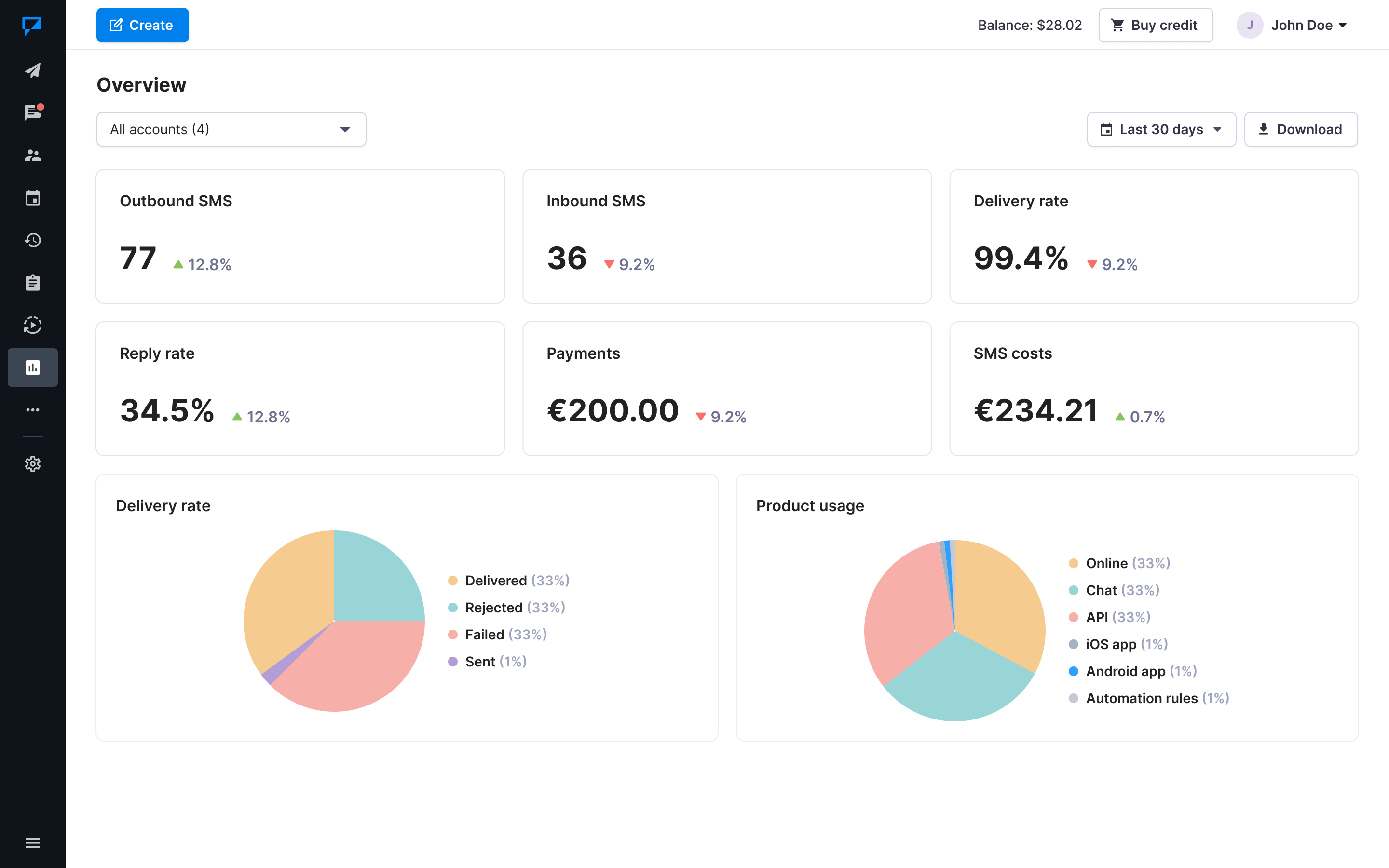
Use the Overview for a high-level picture of SMS performance. For deeper analysis, use Trends to see how performance changes over time, Numbers to analyze activity by phone number, and Sub-accounts to compare messaging activity across your team.
Email report
Email report provide a consolidated view of email performance across your account. Instead of checking individual email campaigns one by one, you can use Reports to understand how your email activity performs as a whole.
You can use email reports to:
- Monitor overall email activity – See how many emails are being sent and delivered across your account.
- Evaluate deliverability – Monitor delivery, bounce, and suppression rates to identify potential problems with your email sending.
- Understand engagement – Track opens and clicks to see how recipients interact with your emails.
- Monitor negative signals – Keep an eye on unsubscribes and spam reports, which can help you identify changes in audience response.
- Compare performance – Analyze results over time and across sub-accounts and senders to identify differences in performance.
- Analyze link engagement – Review total and unique clicks to understand which links recipients interact with.
To review your email performance, go to Reports → Email. Select an account and time period to focus on the data you need.
Start with the Overview to understand overall delivery and engagement. If you need more detail, use Trends to analyze changes over time, Sub-accounts to compare activity across your team, Senders to compare sender performance, and Links to analyze link engagement.
Reporting data can help you spot changes that may be difficult to see when reviewing campaigns individually. For example, an increase in email bounces, a decrease in SMS delivery rates, or higher messaging costs across the account can indicate an area that needs closer investigation.